Information Services Technology Chatbot Info
Meet Chatbot - CHIP!
 Chatbot CHIP is a generative AI-powered assistant designed to help users navigate Information Services IT services. It provides instant answers to frequently asked IT-related technical questions and guides users to answers, like how to change a password, username, or how do I login to UR Courses, and more.
Disclosure: Conversations with Chip are collected and may be reviewed by authorized Information Services administrators to improve safety, accuracy, and performance. While we strive for accuracy, AI-generated content may contain errors. By using this service, you acknowledge that your interactions may be analyzed by our staff.
Chatbot CHIP is a generative AI-powered assistant designed to help users navigate Information Services IT services. It provides instant answers to frequently asked IT-related technical questions and guides users to answers, like how to change a password, username, or how do I login to UR Courses, and more.
Disclosure: Conversations with Chip are collected and may be reviewed by authorized Information Services administrators to improve safety, accuracy, and performance. While we strive for accuracy, AI-generated content may contain errors. By using this service, you acknowledge that your interactions may be analyzed by our staff.
FAQs - Quick answers
- Please avoid asking it questions that are not IT tech related and would not logically appear on the Information Services webpages, UR Source pages, or UR Courses guides.
- The accuracy of the bot is being assessed based on how well it answers queries. Asking questions like “how old am I?” will generate an “I’m stumped” response.
- Be Specific - Instead of asking "Tell me about UR Courses," try "What is UR Courses and what can it do for me as an instructor? (bad example as there are buttons for hot topics already set up!)"
- Include Context – if you asked a previous question, make reference to that in the next question.
- Use natural language – avoid one word answers. It is conversational AI, so talk to it as you would talk to a person.
- State your goal – what are you asking it to do? Do you need help? How do I do this? Where is that?
- Students: For help with UR Courses, account setup, WiFi, email, and more.
- Faculty and Staff: For technical support, and system access guidance.
- If chatbot CHIP cannot resolve your issue, it will direct you to the appropriate department or escalate your query to a live support agent at the IS Service Desk.
Yes. The chatbot is integrated with secure university systems and follows institutional privacy and data protection protocols. It does not store personal data beyond what is necessary to assist with your query.
there is a “language selector” feature, you can click on the middle icon in the chatbox area to choose the language you prefer to interact with.
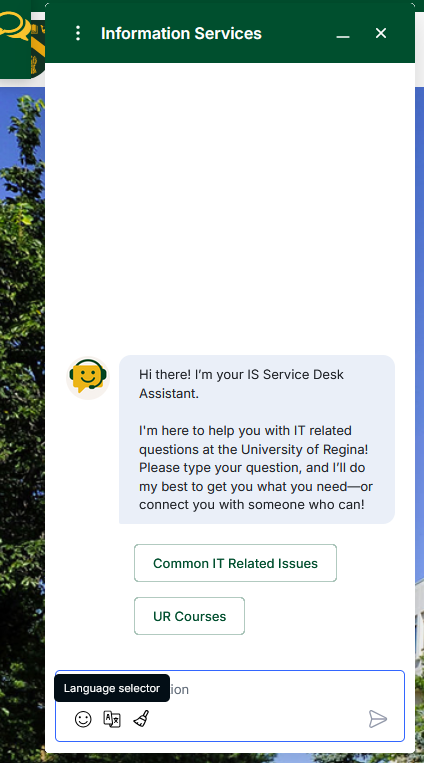
Refer to the Chatbot Language PDF for the list of supported languages.
FAQs - More
- Activating and managing your uregina.ca account
- Accessing UR Courses and troubleshooting login issues
- Understanding Proctortrack
- Setting up WiFi (eduroam), Outlook email, and VPN
- Student and Public Printing; Information on printing and copying services for students.
- Locating public computer labs and printers.
Technology related questions including all data listed above plus this additional information:
- Support for the IS administrative applications, technical questions and UR Courses
- Help with account permissions and system access (password resets)
IS Service Desk
- Contact information for technical support and how to submit service requests.
- Hours of operation and escalation procedures.
Account and Access Management
- Instructions for activating, resetting, or recovering uregina.ca accounts.
- Information on multi-factor authentication and password policies.
Software and Hardware Resources
- Lists of available software for faculty and staff (including licensing and download instructions).
- Hardware purchasing guidelines and support for university-owned devices.
Network and Connectivity
- Guides for connecting to campus WiFi, VPN, and remote access services.
- Information on network security and troubleshooting connectivity issues.
Teaching and Learning Technologies
- Support for classroom technology, lecture capture, and online learning platforms.
- Training resources for tools like Banner, UR Courses, Zoom, and Microsoft Teams.
Policies and Procedures
- IT security, privacy, and responsible use policies.
- Procedures for reporting incidents or requesting new services.
Printing Services
- Faculty and staff can log into UR Source to access the online print order site.
- Order a wide range of products, including stationery, merchandise, and secure uploads for exams and confidential documents.
- Digital file upload and secure, password-encrypted submission options are available.
Printing Services Offered
- Digital production printing (including white, metallic, and clear dimensional ink).
- Large format printing (posters, banners, wall/floor graphics, canvas prints, vinyl signs, decals).
- Digital die-cutting for custom shapes without expensive dies.
- Bindery services (coil and cerlox binding), faxing, scanning, and specialty printing.
- Print project management and procurement support.
- Specialty Merchandise.
- Personalized University of Regina products (drinkware, ornaments, postcards, coasters, playing cards, and more) available in small quantities.
Specialty Merchandise
- Personalized University of Regina products (drinkware, ornaments, postcards, coasters, playing cards, and more) available in small quantities.
- Support and Expert Advice
In-house designer available for consultation. - Expert advice on design, file preparation, and production quality.
- Tips for accepted file types, sending files, and file conversion.
Contact and Hours
- Phone: 306-585-4488 | Fax: 306-585-4780 | Email: Printing.Services@uregina.ca
- Location: Administration-Humanities Building, Room 118
- Hours: Monday to Friday, 8:15 AM – 4:30 PM
- Feedback and Continuous Improvement
- Online survey available for feedback on Printing Services.
What kind of questions can I ask?
Overview of UR Courses
- Introduction to UR Courses as the University of Regina’s primary online learning environment, used by both instructors and students.
Instructor Guide
- Step-by-step instructions for instructors on how to use UR Courses.
- Guidance on creating and managing course content, activities, and assessments.
- Tips for organizing courses and communicating with students.
Student Guide
- Instructions for students on accessing and navigating their courses.
- How to find and submit assignments, participate in activities, and communicate with instructors.
Navigation Help
- Guidance on different course layouts (week-by-week, topic-based, or tile-based).
- Tips for navigating courses, understanding global navigation, and finding course materials.
What’s New
- Updates and new features in UR Courses.
- Contact information for support and feedback (Service.Desk@uregina.ca)
Account Management and Access
- How to activate, reset, or recover your uregina.ca account.
- Multi-factor authentication (MFA) setup for M365 accounts (including Outlook email).
- Find username and password, change password, and diagnose account problems.
Student and Employee Technology Services
- UR Courses (Learning Management System) login and support.
- UR Self-Service login for academic and financial information.
- Outlook email login and setup instructions.
- Free M365 access and downloads for students and employees (up to 5 devices).
WiFi and Network
- Eduroam and other wireless network setup and troubleshooting.
- Information on campus wireless coverage and public computer labs.
Student and Employee Technology Services
- UR Courses (Learning Management System) login and support.
- UR Self-Service login for academic and financial information.
- Outlook email login and setup instructions.
- Free M365 access and downloads for students and employees (up to 5 devices).
Software, Downloads, Hardware, and Printing
- Access to AppsAnywhere for software distribution in labs and classrooms.
- Download and use of licensed software (e.g., MS Office, SPSS, ArcGIS, NVivo, Solid Edge, Qualtrics).
- Locations and access to public computer labs, printers, copiers, scanners, and mobile charging stations.
- Information on hardware and software support for university-owned equipment.
Remote Learning and Exams
- Support for remote learning, VPN setup, and online/proctored exams (including Proctortrack and Zoom).
Security and Policies
- Information on IT security, privacy, and responsible use policies.
- Emergency notification app (Alertus) and campus safety resources.
Service Desk
- IS Service Desk contact info for technical support.
- Guides for new students, admissions, and class registration.
- FAQ and troubleshooting for common tech issues.
Visitor and General Public Info
- Visitor information and access to select campus technology resources.
How is the chatbot being improved?
- The chatbot undergoes regular updates based on feedback and usage data. A 30-day testing and quality assurance phase was completed before launch, and ongoing improvements are planned.
Where is the chatbot getting its data from?
Currently the bot points to the following websites and pages (including all documents, pdfs, etc located on them):- www.uregina.ca/is
- The Information Services Knowledge Base
- https://urcourses.uregina.ca/guides
- https://ursource.uregina.ca/is/index.htm
IS Service Desk
Phone: 306-585-4685
Toll-free in Canada: 1-844-585-4685
Email: Service.Desk@uregina.ca
Phone-In Hours
Monday - Thursday: 7:30 AM - 8:30 PM
Friday: 7:30 AM - 4:30 PM
Saturday & Sunday: 8:30 AM - 4:30 PM
IS Service Desk
Education Building 137
In-Person Hours
Monday - Friday: 7:30 AM - 4:30 PM
Dr. John Archer Library
IS Service Desk Help
In-Person Hours
Monday - Thursday: 7:30 AM - 8:30 PM
Friday: 7:30 AM - 4:30 PM
Saturday & Sunday: 8:30 AM - 4:30 PM