How to Remove User permissions to Teams/One Drive/SharePoint
Computing Services
Technote #641
Title: How to Remove User permissions to Teams/One Drive/SharePointApplies to: UofR Employees
Section: File & Deployment
Owner: Manager, File & Deployment Services
Last updated: March 6, 2026
Introduction
Has someone in your department recently retired or left their role? Need to quickly remove a user from your entire site collection, but your permission setup is complex?
You can view all users in your site collection and remove one or multiple accounts at once. This will delete the user from the main site and all subsites, including any groups, sharing links, and limited‑access permissions they were part of.
Note:
Prerequisite: You must be a Site Collection Administrator to complete this task.
- If you are the owner of the Team or SharePoint site, you should normally have this level of access.
- If you do not see the required permissions, please contact the Service Desk to request the appropriate access or further assistance.
Instructions:
Follow the steps below to access the All People page and remove users from your site collection.- Go to your site collection’s root site (top‑level site).
In your URL, remove everything after the site name.
Example: https://uregina.sharepoint.com/sites/EWGtestteam/SitePages/Home.aspx
becomes https://uregina.sharepoint.com/sites/EWGtestteam/ - Add the following path to the end of your site URL: _layouts/people.aspx?MembershipGroupId=0
https://uregina.sharepoint.com/sites/EWGtestteam/_layouts/people.aspx?MembershipGroupId=0
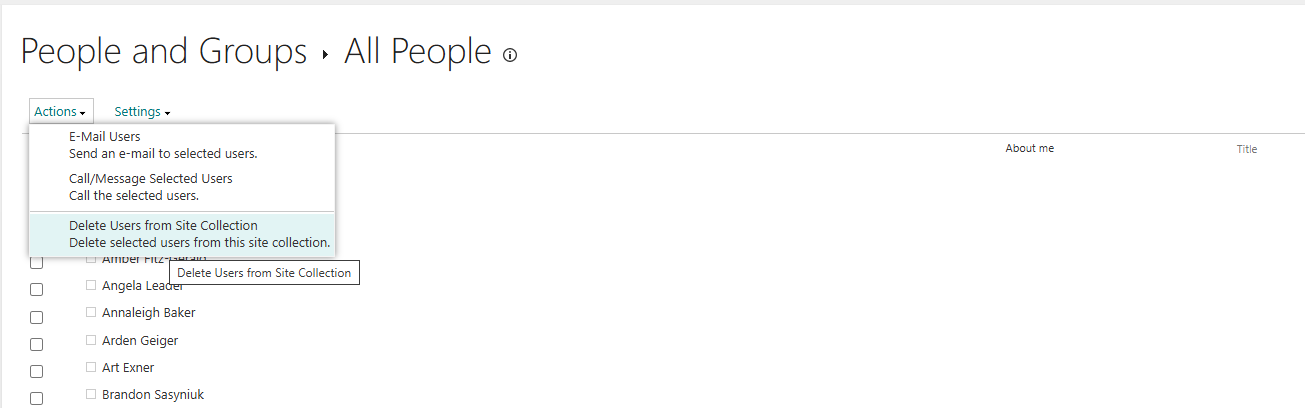
Note: These steps can also be used to manage users in your own OneDrive.
For OneDrive,
To find your exact personal OneDrive URL, follow this path in OneDrive Web:
OneDrive web → Settings (OneDrive settings) → More settings → Diagnostic Information → OneDrive web URL
Once you have your OneDrive web URL, the full URL with the added path will look similar to:
https://uregina-my.sharepoint.com/personal/USERNAME_uregina_ca/_layouts/people.aspx?MembershipGroupId=0
Conclusion:
This technote describe the procedure to remove all access of a specific person to a SharePoint Site or your personal One-Drive